

KhrisDigital is supported by readers like yourself. We may earn a commission when you purchase through our links (at no extra cost to you).

Khris’ Take
I discovered Systeme.io three years ago, and honestly, I wasn’t even looking for a new platform. The founder, Aurelian Amacker, personally reached out to me, and after weeks of hesitation, I finally gave it a try. I was blown away. This all-in-one funnel builder and marketing platform is clean, simple, and shockingly powerful, especially for the price. From drag-and-drop page design to built-in email marketing, product delivery, automations, and more, it has everything most creators and marketers need to run their business. What really hooked me was how beginner-friendly it felt, without sacrificing serious functionality. If you’re tired of tech overload and want something that works right out of the box, Systeme.io is absolutely worth checking out.
| Best For | Solopreneurs & Business owners |
| Price | $27/month |
| Promotion | Free Account Here |
Imagine finding a tool that replaces half a dozen others, simplifies your workflow, and doesn’t drain your budget.
That’s exactly what happened when I stumbled upon Systeme.io three years ago.
At first, I was skeptical.
Could one platform really build sales funnels, email marketing, course creation, and more? But the more I used it, the clearer it became: this wasn’t just another flashy tool but the real deal.
In this Systeme.io review, I’m pulling back the curtain on my three-year journey with the platform.
I’ll cover everything, the standout features, the hiccups, what it’s great at, and where it falls short. If you’re wondering whether this platform is worth your time (and money), stick around.
What is Systeme.io?
If you’ve ever tried to build an online business, you probably know the struggle of juggling different tools. You’ve got ClickFunnels for your sales funnels, GetResponse for email marketing, Teachable for online courses, and maybe even WordPress for blogging.
It’s like trying to run a bakery where the ovens are in one building, the ingredients are stored two blocks away, and the display counter is across town. Chaotic, right?
That’s precisely the headache Systeme.io set out to solve.
It’s like walking into a fully stocked kitchen where everything you need is right there; you see your mixers, ovens, ingredients, and the cash register.
Launched by Aurelian Amacker, an online marketer who got fed up with the patchwork of disconnected tools, Systeme.io is the all-in-one platform designed to streamline everything.
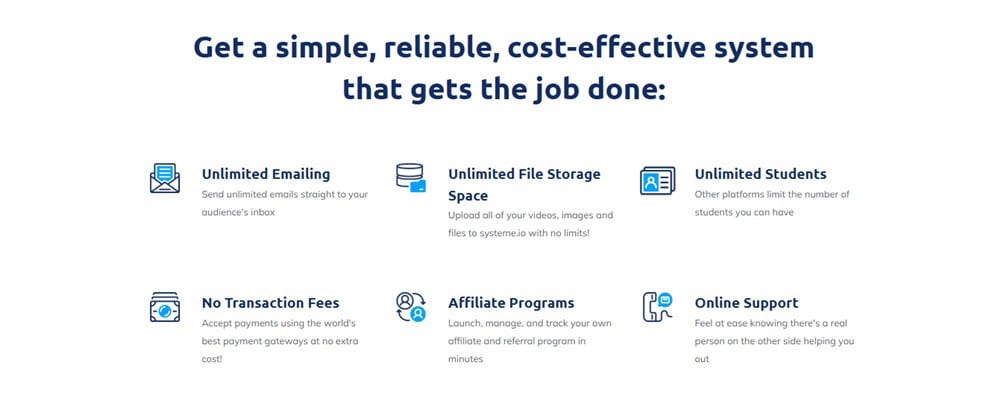
With Systeme.io, you get:
- A funnel builder to capture leads and drive sales,
- An email marketing system to nurture those leads,
- A website to showcase your brand,
- A course creator to sell your knowledge,
- And even affiliate management to grow through partnerships, all in one place.
It’s built for simplicity, so even if you’ve never set up a website or designed a funnel, you can get started without feeling like you’re cracking a secret code.
It’s the IKEA of online marketing, you get all the parts you need, easy-to-follow instructions, and you’ve built something impressive before you know it.
What Sets Systeme.io Apart?
While many platforms lure you in with flashy promises and “free” trials that end before you can even test the waters, Systeme.io does things differently.
Their Free Plan is free, not a stripped-down version, not a temporary tease, just straight-up, full access to core features without pulling out your wallet.
And the best part?
As they’ve added more features over the years, they haven’t made it harder to use. It’s still as intuitive as flipping a switch.
If you’ve been frustrated with duct-taping multiple platforms to keep your business running, Systeme.io is like switching from juggling flaming swords to holding one solid torch. Simple, effective, and powerful.
Who Should Use Systeme.io?
Systeme.io is perfect for anyone looking to manage their entire online business from a single platform without the hassle of juggling multiple tools.
Solopreneur or small business owners
If you’re a solopreneur or small business owner, you’ll appreciate how much easier it is to handle funnels, email marketing, membership sites, and blogs without switching tabs or managing endless subscriptions.
You can launch your entire business from one dashboard.
Many entrepreneurs spend hundreds of dollars monthly on separate tools, but Systeme.io packages it all together, saving time and money.
Course Creators and Coaches
The built-in course creation and membership site features are a significant plus for course creators and coaches.
Instead of piecing together Teachable or Thinkific with an email provider, you can host, market, and sell your courses from Systeme.io. The learning curve is minimal, and the integrations are seamless, making it incredibly easy to set up.
Affiliate Marketers
Affiliate marketers also find Systeme.io incredibly useful. The platform includes an affiliate management system, which allows you to recruit partners, track sales, and automate payouts directly from your dashboard.
This eliminates the need for third-party plugins or complicated tracking setups.
Digital Products Sellers
If you sell digital products like eBooks, software, or membership subscriptions, Systeme.io makes setting up a funnel and selling simple.
Everything is integrated; you don’t struggle with PayPal buttons or complex checkout pages.
Service Providers
Service providers like coaches, consultants, and freelancers can use the platform to book clients, run webinars, and automatically follow up. It’s a one-stop solution that replaces the need for separate scheduling tools, CRMs, and email marketing software.
Why I Chose Systeme.io (Personal Experience)
I first signed up for Systeme.io three years ago, not out of curiosity, but because the founder, Aurelian Amacker, personally reached out to me.
I’d heard whispers about the platform from a few creators but never paid much attention. To be honest, I was a bit skeptical. A free plan? A low price tag compared to giants like ClickFunnels and Kartra? It sounded too good to be true.
At that time, I was neck-deep in ClickFunnels, Kartra, and Systeme.io seemed like just another shiny object in a crowded space.
I dragged my feet for weeks, even after Aurelian kept following up. But eventually, I gave in and decided to test it for 30 days.
To my surprise, I was completely mind-blown by its capabilities. The platform wasn’t just functional; it was straightforward to use.
For someone like me, who’s always been a bit wary of the techy side of online tools, it felt like a breath of fresh air. Cool templates, easy-to-customize designs for pages and checkouts…it was all there, and it just worked.
Now, three years later, I’m still using Systeme.io.
Not only has it kept up with the competition, but it’s grown dramatically over the years. Despite fierce competition in the sales funnel software world, it’s still kicking strong.
That’s why I’m finally here, writing my complete review about Systeme.io.
What Features Will You Get With Systeme.io?
Funnel Builder: Building Your Digital Highway
Imagine trying to build a highway with bits and pieces scattered all over town.
One supplier has the asphalt, another has the concrete, and you’re running back and forth just trying to piece it together.
That’s what traditional funnel building can feel like when using multiple tools.
But with Systeme.io’s Funnel Builder, it’s like walking into a warehouse where everything is neatly arranged and ready to go. From opt-in pages to multi-step sales funnels, you get a full drag-and-drop experience.
No more juggling separate platforms or hunting for connectors, it’s all in one place.
What I love most is the clean, intuitive interface. You’re not wading through clunky menus or dealing with outdated templates.
It’s just the essentials, laid out simply. Whether setting up lead capture pages, creating upsell paths, or building webinar funnels, the process is refreshingly smooth.

The templates aren’t the kind you’d be embarrassed to show off either. They’re clean, professional, and ready to convert. Funnels that used to take me days on other platforms now only take a few hours with Systeme.io.
One of the standout features is how Stripe and PayPal are integrated directly into the funnel builder. It’s like setting up a checkout counter inside your digital store—no extra plugins or third-party headaches.

And here’s the kicker: A/B Testing is built right in.
Without third-party software, you can experiment with different headlines, page designs, or call-to-action buttons. For me, this was a game-changer!
I could finally optimize in real time and see what worked best.
So, how do you actually build a funnel in Systeme.io?
It’s surprisingly easy:
Just head over to the Sites tab, click Sales Funnels, then hit Create.

You’ll give your funnel a name, pick a domain (if you’ve set one up), and choose your currency.
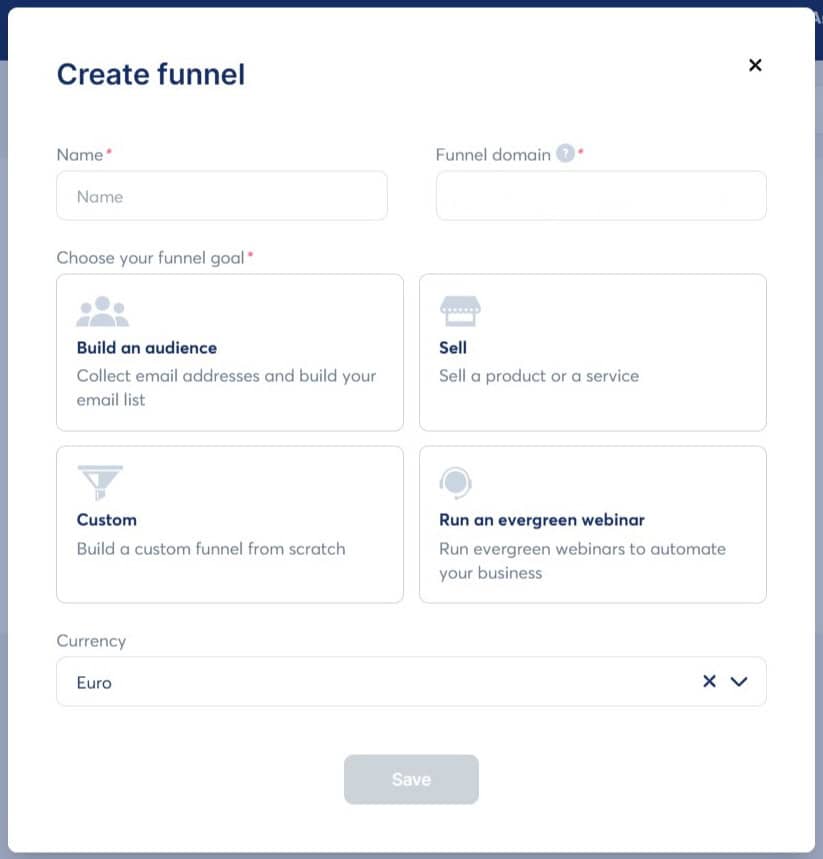
Then you’ll pick from four types of funnels.
You can choose to build an audience. This is the simplest option and excellent for growing your email list.
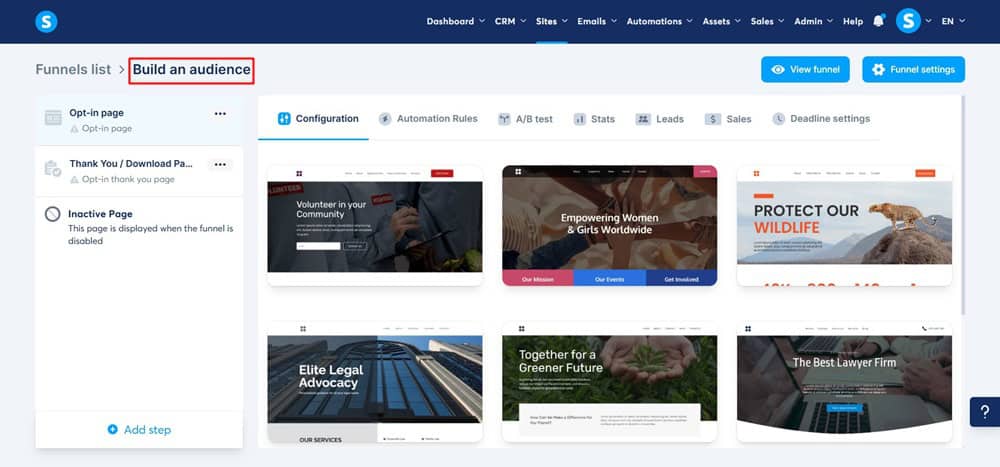
It includes just an opt-in page and a thank-you page.
You can also choose sell.
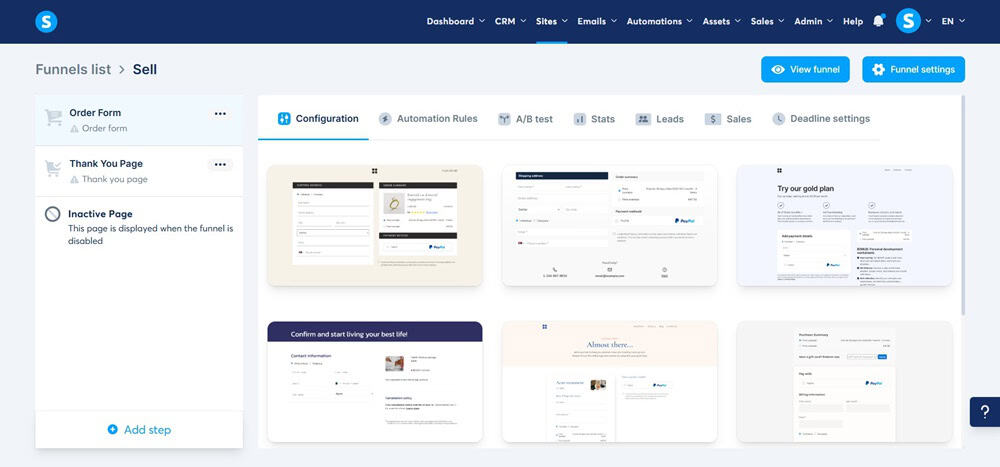
This one comes ready with an order form and a thank-you page. Perfect for selling your offers.
You can also choose to create a Custom Funnel. This gives you a blank canvas, and it is best for experienced users who want complete control.

You can build whatever pages you want here.
You can also choose to run an Evergreen Webinar. This type is designed for selling automated webinars.

(Note: This option is only available on the Webinar and Unlimited plans.)
Need more pages? Just click + Add a step and keep building.
Landing Page Builder: Crafting Your First Impression
Think of your landing page as the welcome mat to your digital store.
If it’s outdated or messy, visitors will walk right by. With Systeme.io’s Landing Page Builder, you get the tools to roll out the red carpet, no coding required.
It’s fully drag-and-drop, with pre-made templates that look like a pro designed them.

You can launch a fully responsive, polished landing page in minutes, not days. It’s like unboxing a ready-made storefront where you add your products and open the doors.
One of the best parts? You can tweak text, images, buttons, and even add custom HTML if you want to get fancy. It’s as easy as moving blocks around on a shelf. The builder also supports pop-ups and forms to capture leads from your landing page.
And it’s not just about looks, these pages are optimized for speed and conversions. In my experience, I’ve launched pages that load faster and rank better without the usual SEO headaches.
Split testing is a breeze if you want to experiment with different designs.

You can set up two variations, run them side by side, and see which wins, no extra plugins are required.
Pipeline Feature: Your Sales GPS

If building a funnel is like setting up your store, Systeme.io’s Pipeline Feature is your business GPS. It gives you a clear, visual map of your entire sales process.
You know exactly where your prospects are, from lead capture to final sale.
Setting it up is entirely drag-and-drop. It’s like moving chess pieces on a board; you click and slide them into the right place. This makes tracking progress, identifying bottlenecks, and optimizing your sales journey easy.
For example, if you notice a lot of leads getting stuck at the checkout phase, it’s like spotting a traffic jam on your GPS, you know exactly where to go to fix it.
The best part?
It’s fully integrated. When someone signs up, registers for a webinar, or makes a purchase, they are automatically moved along the pipeline. There are no manual updates, no switching back and forth.
Before using this, I practically wrestled with spreadsheets and third-party tools to track my sales process.
Now? It’s all on one screen, like watching your sales unfold live.
Email Marketing: Your Digital Post Office
Email marketing can feel like running your own post office with you writing, sending, tracking, and optimizing every message.

With Systeme.io, it’s like you’ve automated the whole building.
You can create and send newsletters, set up automated sequences, and manage your contact lists without third-party tools.
The email editor is drag-and-drop, and some templates make it even faster if you’re in a hurry.
One of the features I love most is the Automation Builder.
It’s like setting up a conveyor belt for your emails. New subscribers get onboarded, abandoned carts get follow-ups, and leads are nurtured automatically. It’s visual, clean, and doesn’t require coding.
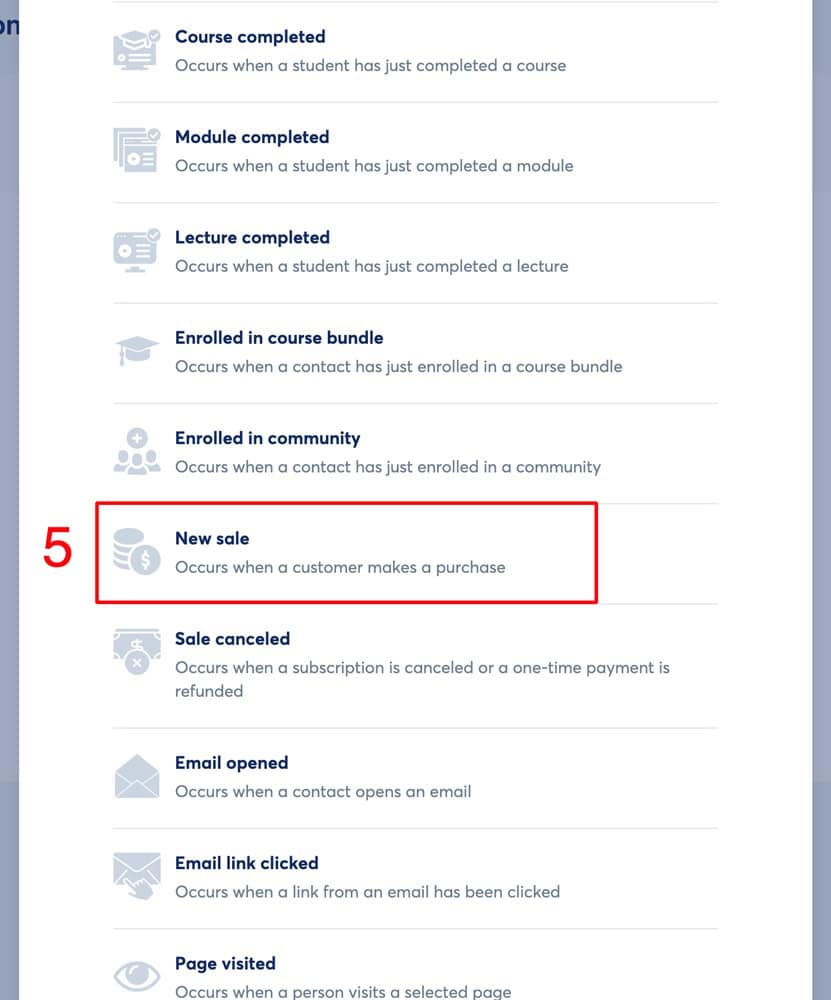
And it doesn’t stop there.
You can segment your audience based on their actions, like opening an email or clicking a link. This allows you to send targeted messages that feel personal and convert better.
Deliverability is rock solid, too.
I haven’t seen my emails land in the spam folder, and my open rates are consistently reasonable. It’s like knowing your mail is always delivered to the correct address.
Website Builder: Your Digital Storefront
Building a website used to feel like assembling furniture with instructions written in a different language.
But with Systeme.io’s Website Builder, it’s more like snapping together LEGO bricks. It’s intuitive, modular, and fun.
The builder is drag-and-drop with modern, clean templates that don’t look like they were designed in the early 2000s. I was genuinely surprised when I built an entire website in just one day without touching a line of code.
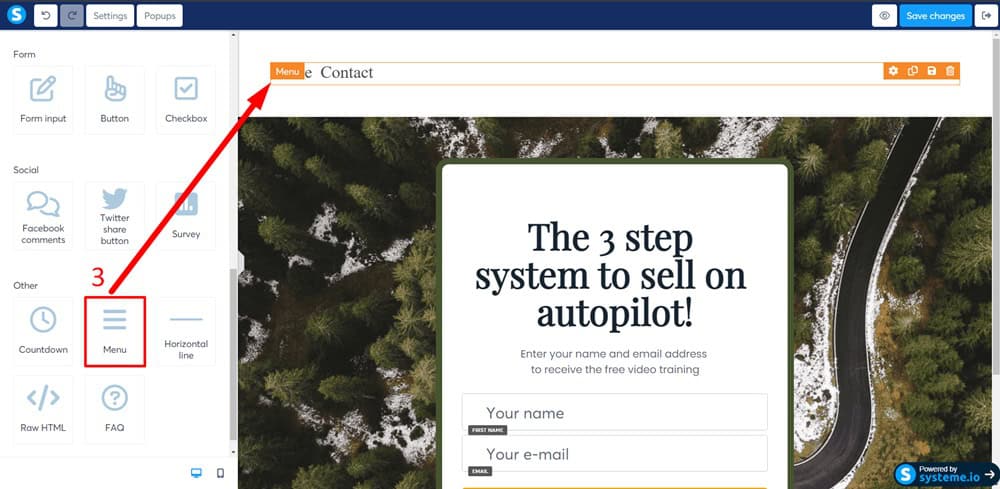
You can easily add homepages, about pages, contact forms, and link them together seamlessly.
Need to add a funnel, opt-in form, or a course?
It’s all integrated, so you’re not scrambling to find plugins or third-party apps.
SEO is also built right in. You can directly adjust meta descriptions, URLs, and page titles from the editor. It’s like having a toolbox where every tool fits and works.
Blogging Feature: Your Digital Publishing House
If you’ve ever tried to run a blog on WordPress, you know the drill: setting up hosting, battling with plugins, and wrestling with constant updates.
It’s like building a house from scratch with bricks here, cement there, and hoping the whole thing holds up when the storm comes.
Systeme.io’s Blogging Feature changes all of that.
Think of it as stepping into a pre-built publishing house. The walls are already up, the furniture is set, and all you need to do is start writing.
Everything you need to build, publish, and manage your blog is right there, no third-party software, tangled integrations, just pure simplicity.
The editor is refreshingly straightforward. It’s like sitting down at a minimalist desk, just you, your thoughts, and your content. Your headers, images, and text formatting are at your fingertips.
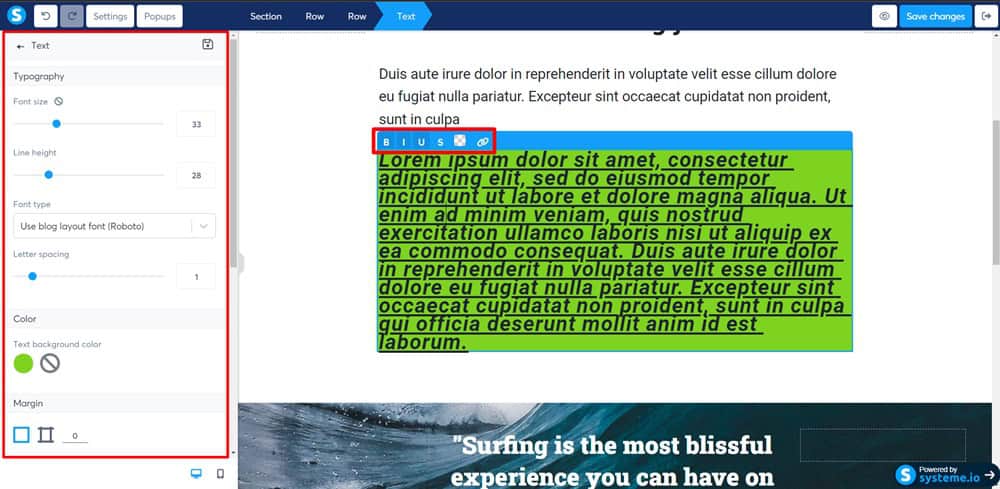
And when it comes to SEO, you’re not left hanging.
It’s like having your SEO assistant right inside the platform. You can customize URLs, add meta descriptions, and optimize for keywords directly in the editor.
Systeme.io doesn’t just let you blog, it enables you to turn your blog into a lead-generating machine.
You can easily embed lead capture forms right into your posts. Every visitor is an opportunity to capture a lead.
I’ve personally used this to grow my email list effortlessly. Content upgrades, lead magnets, and sign-up forms are all part of the same flow.
There is no coding, no extra steps, just results.
Easy to Use Course Creator
Creating and selling online courses is made incredibly simple with Systeme.io’s Course Creator.
You don’t need fancy third-party software. Everything you need is already built in. I’ve created multiple courses with it, and the process is shockingly smooth.
Setting up a course is straightforward.
You can easily create modules and lessons, upload videos, add quizzes, and structure your curriculum by clicking and dragging elements into place.

The interface is clean and uncluttered, so you’re not fighting with endless settings to get your content live.
What I love most is how it handles student management. Enrollments are tracked automatically, and you can even drip-feed content to your students if you want them to follow a specific schedule.
This feature is perfect if you run coaching programs or want to keep your students progressing week by week.
Another highlight is the seamless integration with the rest of Systeme.io.
You can embed your course directly into a sales funnel, link it to automated email sequences, and even set up upsells or downsells with just a few clicks.
This meant I could sell, deliver, and follow up on my courses all from one platform.
If you’ve been thinking about launching your online course but dreading the tech setup, Systeme.io’s Course Creator is as user-friendly as possible.
Advanced automations
One of Systeme.io’s standout features is its Automations.
If you’ve ever struggled to keep up with repetitive tasks like sending follow-up emails or moving leads through different stages of your funnel, this tool is a game-changer.
It allows you to automate almost every part of your sales and marketing process, saving you time and keeping things running smoothly.
Setting up an automation is straightforward. The interface is visual and drag-and-drop, so you don’t need coding skills to get things moving.
You start with a trigger.
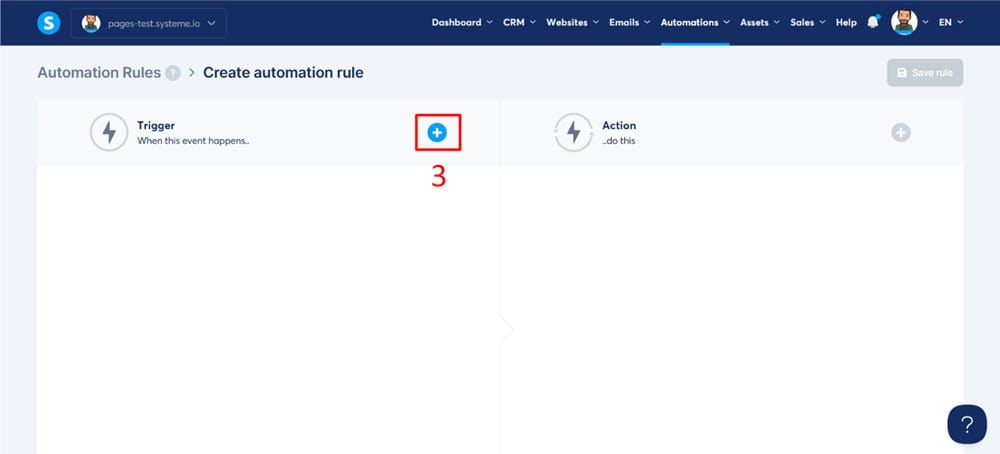
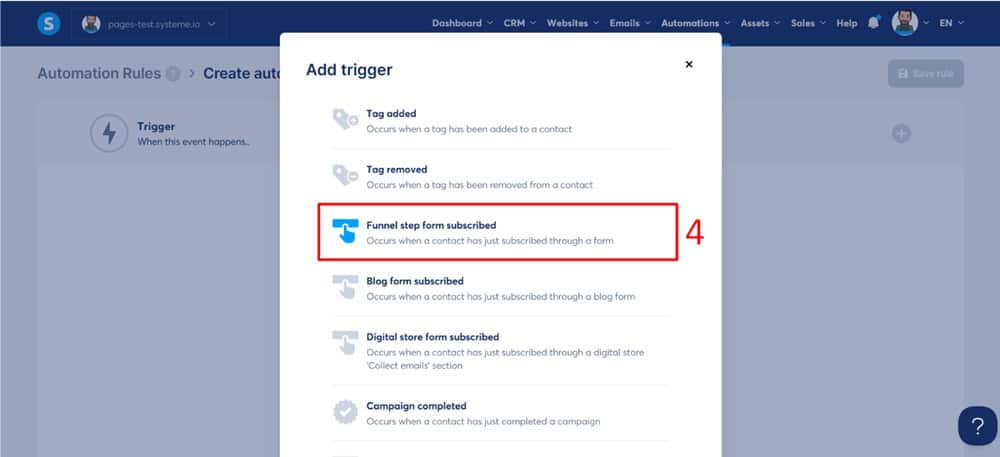
Like someone subscribing to your email list, purchasing a product, or even just clicking a link.
And then define the following actions.
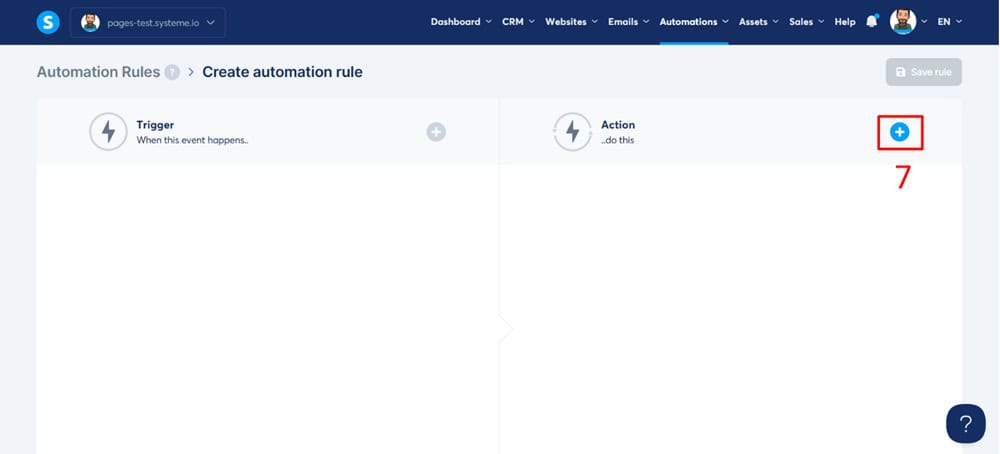
For example, you can automatically send a welcome email, add them to a specific funnel, and tag them for follow-up, all without lifting a finger.
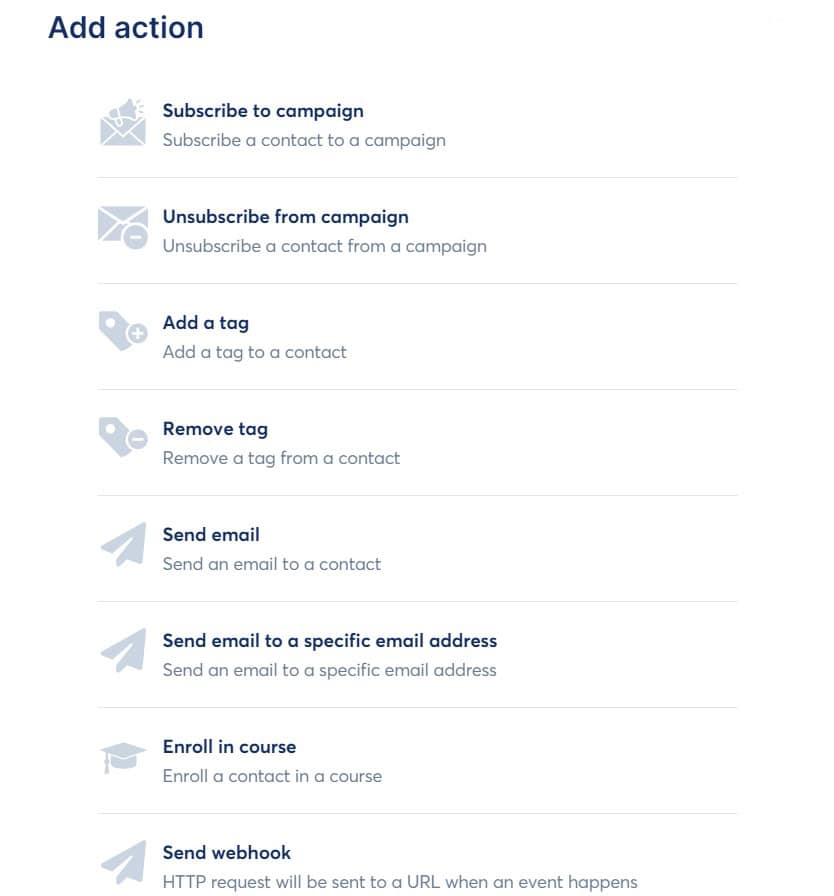
One thing I appreciate is how granular you can get.
You can create paths based on user behavior. If someone opens an email but doesn’t click the link, you can send a follow-up with a different message.
If they do click, you can automatically move them to the next stage of your funnel. This kind of segmentation helps you send the right message to the right person at the right time, which in my experience, massively improves engagement.
In my own business, I’ve used Automations to nurture leads, follow up on abandoned carts, and onboard new clients.
It’s like having a virtual assistant working around the clock, keeping everything moving.
In-Built Affiliate Program Management
Systeme.io makes setting up and managing your affiliate program incredibly simple.
Unlike other platforms, which require expensive add-ons or complicated third-party tools, affiliate management is included in every plan, even the free one.

Setting up your program is straightforward. You can create custom commission structures, set payout schedules, and manage affiliates from a clean, user-friendly dashboard.
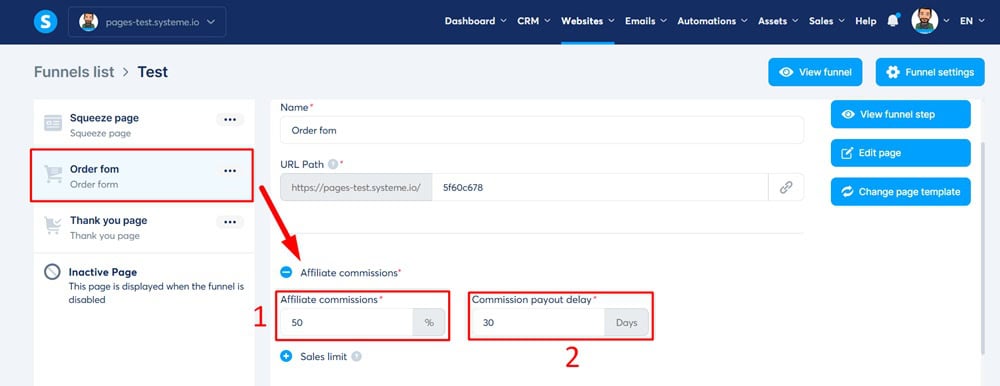
It even allows you to track clicks, leads, and sales in real-time, so you always know how your affiliates perform.
One of the best parts is the ability to automate payments. You can set specific thresholds for payouts and let the system handle everything.
This means less admin work and no more chasing down affiliates to get their payment info. This feature alone saved me hours of backend management.
I’ve personally used it to grow my marketing reach. With just a few clicks, I could recruit affiliates, provide them with unique tracking links, and even supply them with marketing materials like banners and email swipes.
Everything is in one place, so I’m not digging through files or jumping between different tools.
Run Webinars
Systeme.io makes running webinars effortless.

Whether you’re hosting live events, automated webinars, or hybrid sessions, it’s all integrated into the platform without needing third-party tools.
I was initially surprised by the smooth setup process. It’s all drag-and-drop, and you can go live in just a few clicks.
You can customize the entire experience.

You can brand your registration pages, add countdown timers, and even include lead capture forms to collect attendee information before the event starts.
During the webinar, you can engage with attendees through live chat, share your screen, and present slides directly from the interface.
The platform also supports automated follow-up emails, so you can nurture those who didn’t show up or follow up with those who did. In my own experience, this has boosted my engagement rates significantly.
Systeme.io also records each session automatically, allowing you to repurpose the content as an evergreen webinar or share it with your audience later. This means you get more mileage out of every event you host.
Create Digital Store

Systeme.io’s Digital Store feature lets you easily sell digital products like eBooks, courses, memberships, and more, all without needing third-party platforms.
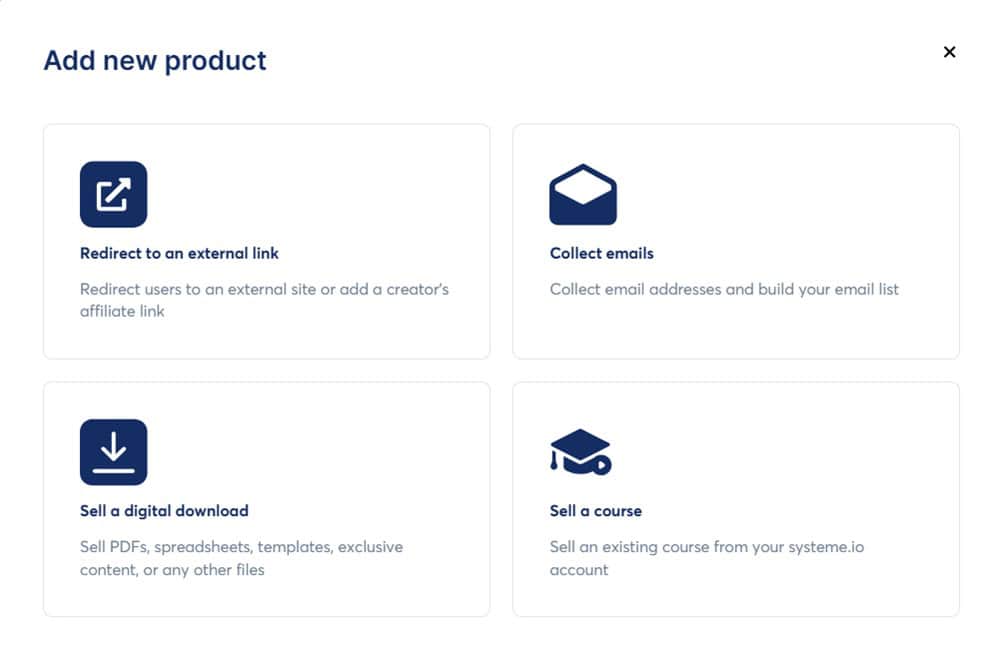
You can list your products, set prices, and manage everything from one simple dashboard.
One thing I appreciate is how clean and intuitive the storefront looks. You don’t have to be a designer to make it look professional.
There are a variety of templates and you can customize the layout, add product descriptions, and even upload digital downloads from the platform.

The payment process is seamless, too. Systeme.io integrates with major payment processors like Stripe and PayPal, allowing you to accept payments from customers worldwide.
Plus, you can configure upsells and downsells to increase your revenue without any complicated setups.
The biggest benefit for me has been how it handles everything from checkout to delivery.
When someone buys one of my digital products, the entire process is automated. They get immediate access to the product, and I don’t have to lift a finger.
Built in Calendar Feature
Systeme.io’s Calendar Feature is a powerful tool for managing appointments, coaching sessions, and consultations from within the platform.
You can access the “Calendar” section from the “CRM” menu.
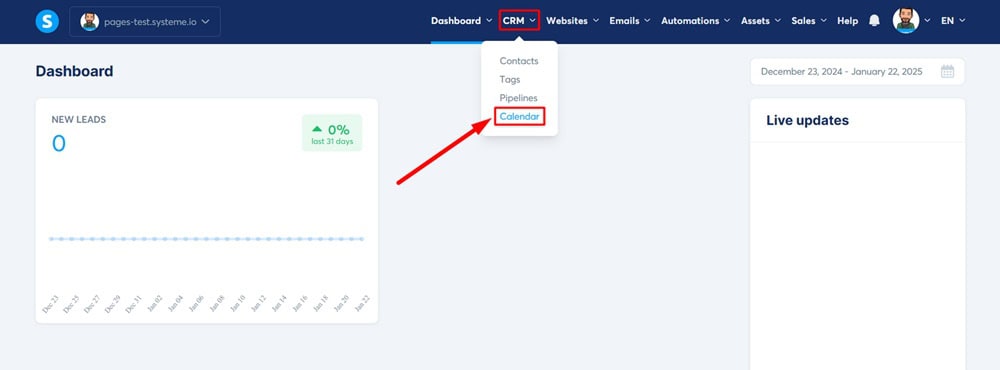
You know how disconnected things can feel if you’ve been using third-party schedulers like Calendly or Acuity. Systeme.io changes that by bringing everything under one roof.
Setting up your calendar is straightforward.
You can create multiple event types, customize your availability, and even set up automated reminders for you and your clients.
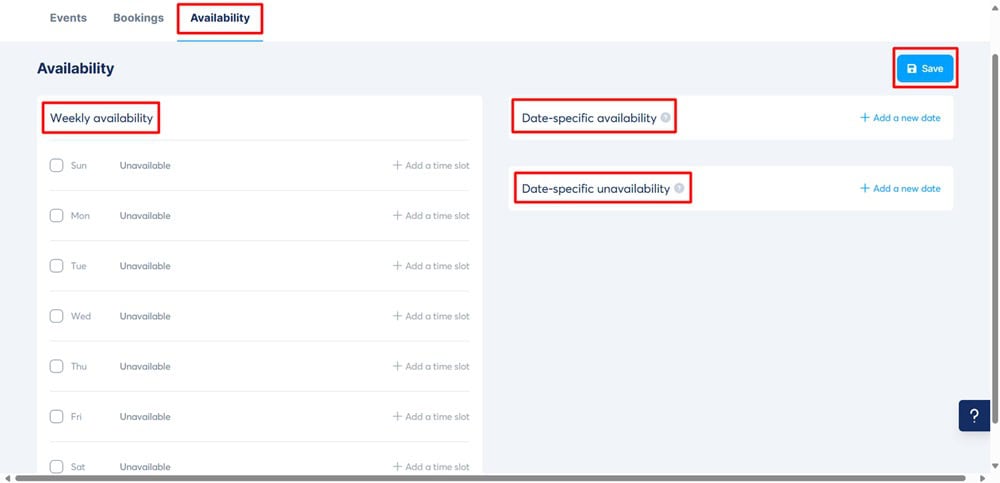
I appreciate the ability to link the calendar directly to your funnels.
For example, if someone signs up for a coaching package, they can automatically schedule their sessions without any back-and-forth emails.
It also syncs perfectly with the email automation feature. When clients book a session, they automatically receive confirmation emails, reminders, and even follow-up emails. This saves time and also reduces no-shows.
I’ve used it for client consultations, and it’s been a smooth experience.
There are no double bookings or manual scheduling, just a clean, automated process that keeps things running efficiently.
Marketplace

Systeme.io’s Marketplace is a built-in hub where you can buy and sell digital products, services, and funnels. Unlike typical platforms where you have to market your products endlessly, the Marketplace gives you instant visibility to Systeme.io’s entire user base.
If you’re a course creator, coach, or consultant, you can list your offerings inside the Marketplace, making it easy for others to discover and purchase.

The setup process is straightforward. You list your product, set your price, and it’s live.
What’s even better is that you can tap into existing affiliates who are actively looking for products to promote. This means more reach without extra marketing spend.
One thing I appreciate is the filtering options. You can browse by category, product type, and even popularity. This makes it easy to find precisely what you’re looking for: a sales funnel template, a coaching program, or a ready-made course.
I’ve used the Marketplace to grab pre-built funnel templates, saving me hours of design and setup time.
Smart Integrations
Systeme.io’s Smart Integrations are designed to connect seamlessly with the tools you’re already using.
While the platform itself is built to be all-in-one, there are times when you might want to link it up with other apps. That’s where integrations come in.
Systeme.io integrates with major payment processors like Stripe and PayPal, making it simple to accept payments globally. For email marketing, it connects easily with SMTP providers, so you can use your own email server without hassle.
Systeme.io connects with Zapier for more advanced automation, opening up endless possibilities.
You can trigger actions in thousands of apps, like adding new leads to a Google Sheet, sending Slack notifications for purchases, or syncing with your CRM.
I’ve personally found these integrations to be incredibly smooth. There’s no heavy coding, just straightforward connections that take minutes to set up.
Built-in Analytics
Systeme.io comes with built-in Analytics that help you track the performance of your funnels, emails, sales, and more.
Unlike some platforms that require you to integrate third-party tools to see your basic metrics, everything is available right from the dashboard.
You can monitor key data points like page views, opt-in rates, sales conversions, and email open rates.
The layout is clean and straightforward, so you don’t have to dig through endless menus to find what you need. In my experience, this has saved me countless hours. I can spot what’s working and what needs tweaking almost instantly.
One thing I appreciate is the ability to track the entire funnel journey.
You can see where visitors drop off, which pages convert the best, and how your email campaigns are performing. This kind of insight makes it easy to optimize your strategy without the guesswork.
For me, the analytics dashboard has been a game-changer. I used to jump between Google Analytics, Mailchimp, and spreadsheets to get a clear picture of my sales flow.
Now, I just open Systeme.io, and it’s all there.
How Much Does Systeme.io Cost?

Systeme.io offers four different pricing plans, each designed to fit different stages of your business growth.
What sets it apart from many competitors is that even its Free Plan is packed with features that most platforms would charge for.
Systeme.io’s pricing structure is refreshingly transparent and straightforward. There are no hidden fees or upsells. You get precisely what you pay for, and that’s a rarity in this space.
Free Plan
The Free Plan is where most people get started, and to be honest, it’s surprisingly robust. You get access to funnels, email marketing, course creation, and even the ability to host a membership site, all without paying a cent.
Unlike other platforms that strip down their free versions, Systeme.io gives you enough tools to launch and grow your business.
What’s included:
- Up to 2,000 contacts
- 3 sales funnels
- 1 blog site
- Unlimited emails
- 1 membership site
- File storage
- Affiliate program management
If you’re just starting out or want to test the waters before investing, the Free Plan is more than enough to get you started.
Startup Plan ($27/month)
The Startup Plan is perfect if you’re ready to scale a bit. It includes everything in the Free Plan but with much more breathing room and fewer limitations.
What’s included:
- Up to 5,000 contacts
- 10 sales funnels
- 5 membership sites
- 3 custom domains
- Advanced automations
- Webinar hosting
At $27/month, it’s an incredibly competitive option compared to other platforms like ClickFunnels, where you’d easily pay five times as much for similar features.
Webinar Plan ($47/month)
This plan is designed for people who want to leverage webinars for their marketing strategy. In addition to everything in the Startup Plan, you get enhanced webinar capabilities.
What’s included:
- Up to 10,000 contacts
- 50 sales funnels
- 20 membership sites
- 5 custom domains
- Unlimited webinars
- Advanced automations
This plan is perfect if running live or automated webinars is a big part of your sales strategy.
Unlimited Plan ($97/month)
The Unlimited Plan is for those who want zero restrictions. This is where Systeme.io unlocks its full potential. You get unlimited everything.
What’s included:
- Unlimited contacts
- Unlimited sales funnels
- Unlimited membership sites
- Unlimited custom domains
- Unlimited webinars
- Priority support
- Free migration
For $97/month, you remove all caps from your business growth. If you’re serious about scaling and want every tool at your disposal, this is the plan to go for.
What I Love (Pros) and Don’t Love About (Cons) of Systeme.io
Here are the pros and cons of using Systeme.io:
Systeme.io Pros
Systeme.io Cons
Getting Started with Systeme.io
Getting started with Systeme.io is straightforward and only takes a few steps.
Here’s how to do it:
Step 1: Create Your Free Account and Add Your Email
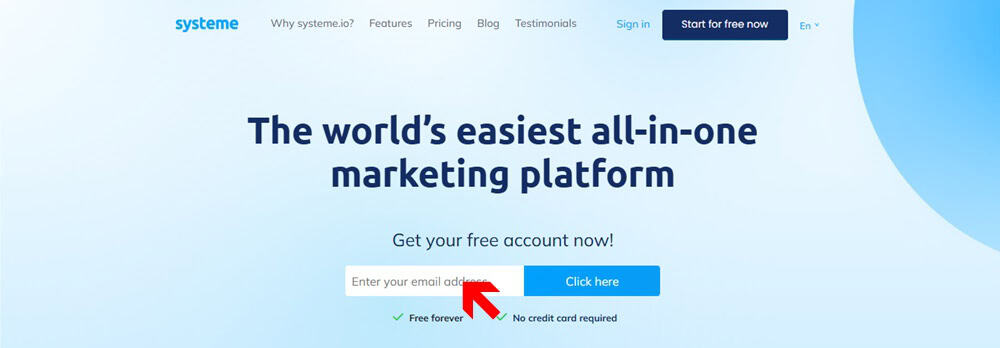
Head over to the Systeme.io website and click on Get Started for Free. You’ll be prompted to add your email address.
After that, you’ll be asked a few questions, such as the kind of business you run, your annual revenue, phone number, and the email address you want associated with your Systeme.io account.
There’s no credit card required, so you can explore the platform without feeling locked in.
Step 2: Confirm Your Email Address
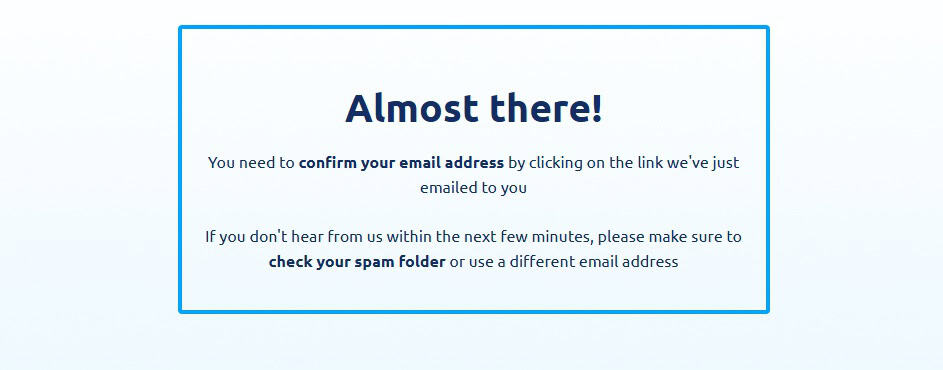
Once you’ve filled out the details, a confirmation link will be sent to your email. Click the link to verify your account.
Step 3: Set Your Password

The confirmation link will take you to a page where you can set up a password for your account. Ensure it’s strong and secure, as this will be your primary login credential.
Step 4: Access Your Dashboard
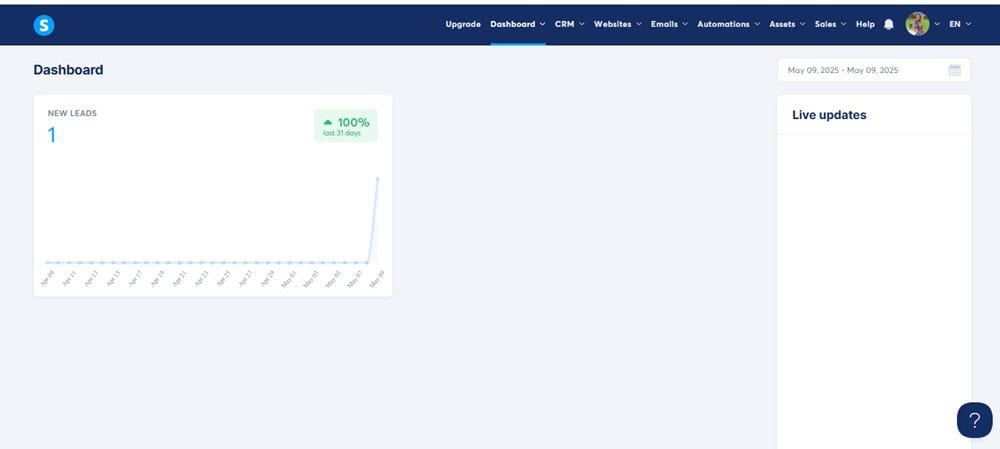
After you accept your password, you’ll be automatically directed to the Systeme.io dashboard. This is where everything happens, from building funnels to setting up email campaigns.
Step 5: Choose What You Want to Build
Right from the dashboard, you can choose exactly what you want to get started with:
- Building a Sales Funnel
- Launching a Website
- Creating a Blog
- Setting Up an Email Campaign
- Designing an Online Course
Systeme.io makes it easy to jump right in without the usual setup headaches.
Systeme.io Alternatives Worth Considering
While Systeme.io is a powerhouse for all-in-one marketing, it’s not the only game in town. Depending on your needs, goals, and budget, one of these platforms might actually serve you better.
Here’s how four top alternatives stack up:
GoHighLevel: Best for Agencies & Resellers
If you run a marketing agency or want to create your own white-labeled SaaS product, GoHighLevel is a beast.
Unlike Systeme.io, GoHighLevel lets you fully white-label the platform, logo, domain, emails, and everything, and resell it as your own branded tool. That’s huge.
It also offers advanced CRM tools, built-in call tracking, pipeline management, and even SMS marketing, making it a dream for client-based businesses.
What GoHighLevel offers that Systeme.io doesn’t:
- Full white-label and resell rights
- Built-in phone system and SMS marketing
- Advanced CRM and automation pipelines
Systeme.io is better suited for solopreneurs and course creators, but GoHighLevel wins for those building a client-serving machine.
Read my complete GoHighLevel vs Systeme.io comparison here.
Kartra: Best for Complex Businesses with Multiple Products
Kartra is like Systeme.io’s more complex cousin.
It’s super powerful and comes with advanced membership site tools, behavioral automation, video hosting, helpdesks, and analytics dashboards.
If you’re running multiple offers, teams, or need very granular automation, Kartra is a better fit.
What Kartra does better than Systeme.io:
- Built-in helpdesk and ticketing
- Native video hosting with behavior triggers
- More robust reporting and analytics
That said, Kartra has a steeper learning curve and costs more, so it’s not ideal if you’re just getting started.
Read my complete Kartra vs Systeme.io comparison here.
ClickFunnels: Best for Sales Funnel Focus and Community
ClickFunnels is the OG of funnel builders and still super popular, especially for marketers obsessed with high-converting funnels and upsell sequences.
Compared to Systeme.io, ClickFunnels has more prebuilt funnel templates, stronger integrations, and a massive user community that churns out training, tips, and hacks nonstop.
What ClickFunnels has that Systeme.io doesn’t:
- A bigger library of funnel templates
- Massive user base and community resources
- Easier integration with other third-party tools
But it’s way more expensive and doesn’t include built-in email marketing unless you pay for their top-tier plan.
Read my complete ClickFunnels vs Systeme.io comparison here.
ThriveCart: Best for Checkout Optimization and Lifetime Pricing
ThriveCart isn’t a complete funnel builder like Systeme.io, but it crushes when it comes to high-converting checkouts, upsells, and digital product sales.
It’s not all-in-one, but it integrates easily with course platforms and email tools.
And ThriveCart offers a lifetime deal, meaning you pay once and you’re set for life.
What ThriveCart nails that Systeme.io doesn’t:
- One of the best checkout flows in the game
- Deep upsell/downsell funnel logic
- Lifetime pricing (no monthly fee)
If you already have email marketing and want the best cart + funnel combo, ThriveCart is a smart pick.
Final Thoughts on Systeme.io Review
After three years of hands-on experience with Systeme.io, I can confidently say it’s one of the best all-in-one marketing platforms.
I’ve worked with ClickFunnels, Kartra, and countless other tools, and nothing has matched the simplicity, affordability, and sheer versatility of Systeme.io.
What I appreciate most is that it’s a well-thought-out ecosystem where everything works together seamlessly.
I don’t have to stitch up half a dozen apps to run my business. Funnels, email marketing, webinars, course creation, and even affiliate management are all housed under one roof, and they work.
Of course, it’s not perfect.
There are some limitations with design customization and blogging compared to standalone platforms like WordPress.
But for the price and convenience, I believe it’s the best choice for solopreneurs, small business owners, and anyone looking to grow without the usual tech headaches.
If you’re tired of overcomplicated setups and expensive subscriptions, give Systeme.io a try.
I did, and I haven’t looked back.
Frequently Asked Questions on Systeme.io
Is Systeme.io really free?
Yes, Systeme.io offers a genuinely free plan that isn’t just a watered-down platform version. You can access funnels, email marketing, membership sites, and more. It’s fully functional and not just a trial—if you want, you can run your business entirely on the Free Plan.
What are some good Systeme.io alternatives?
GoHighLevel, ClickFunnels, and Kartra. Each has its strengths, but comes at a significantly higher cost. GoHighLevel is a great all-in-one platform with whitelabel abilities, ClickFunnels is excellent for funnel building, Kartra has inbuilt video hosting.
Is Systeme.io good for email marketing?
Absolutely. Systeme.io includes fully integrated email marketing on all its plans, even the free one. You can easily send unlimited emails, create automated sequences, and manage your list. It also allows for segmentation and tagging, which is crucial for targeted marketing.
Can I build a website on Systeme.io?
Yes, you can build a website with Systeme.io. Systeme.io’s Website Builder is fully drag-and-drop, making it easy to create landing pages, homepages, blogs, and more without coding. You can even optimize for SEO directly within the platform.
Can I run webinars effectively with Systeme.io?
Yes, Systeme.io supports both live and automated webinars. You can easily set up registration pages, manage attendees, and automate follow-up emails. It’s fully integrated, so you don’t need separate tools to run effective webinars.
Is it suitable for affiliate marketing?
Systeme.io includes built-in affiliate management in all its plans, including the free one. You can track clicks, manage payouts, and even provide marketing materials directly from the platform for your affiliates.
